September 9, 2026
Manmohan Singh
A website redesign can consume significant budget, attention and cross-functional effort - yet still deliver little more than a polished online brochure. The problem is rarely visual design alone. It is that the site was planned as a collection of pages rather than as a connected system that guides specific audiences from discovery to a meaningful business outcome.
A high-performing digital marketing website connects customer experience, content, conversion paths, marketing automation, data intelligence and optimisation ownership. This matters as paid media investment rises and every visit becomes more valuable: the IAB reported that US internet advertising revenue reached $258.6 billion in 2024. When acquisition costs are under pressure, organisations cannot afford to send visitors to generic pages with unclear next steps.
For enterprise marketing leaders, product owners and web teams, the objective is not simply to launch a new platform. It is to create an experience that attracts the right audiences, earns trust, captures usable intent signals and improves over time. This guide provides a practical framework for doing that.
Define the business job before designing the website
The first question in a website programme should not be “What should the homepage look like?” It should be: “What business job must this website perform?” Without a clear answer, teams tend to combine every possible objective into one experience, producing vague messaging, overloaded navigation and calls to action that serve nobody particularly well.
A digital marketing website can support several business jobs, but leadership should establish the primary one for each key journey. The choice determines the content model, page templates, data requirements and success measures. A business with a complex B2B offering may need to qualify demand before sales engagement, while an ecommerce brand may need to reduce product-discovery and checkout friction.
| Primary business job | What the website must enable | Typical meaningful conversion |
|---|---|---|
| Acquisition | Attract relevant, high-intent audiences from search, media, partners and social channels | Newsletter signup, guide download, product exploration |
| Qualification | Identify fit, urgency, need and buying context before sales follow-up | Demo request with qualifying details |
| Education | Help buyers understand an unfamiliar category, solution or transformation case | Webinar registration, assessment completion |
| Commerce | Make product comparison, selection and purchase straightforward | Completed transaction |
| Service | Help existing customers complete tasks without unnecessary support demand | Self-service resolution, account action |
This decision framework should be applied at the journey level, not just at the corporate-site level. For example, a “book a consultation” path may be designed for qualification, while a resource hub supports education and an account area supports service. The strongest digital marketing website examples make these purposes visible in their information architecture rather than forcing all audiences through the same generic journey.
Search visibility also belongs in the business-job discussion. Google advises creators to focus on helpful, reliable, people-first content, not content produced merely to capture rankings. That means each high-value page should answer a real buyer question while creating a credible path to the next stage of engagement.
Build dedicated experiences for priority audience journeys
Most organisations serve multiple audiences: economic buyers, technical evaluators, procurement teams, existing customers, partners and prospective talent. Giving all of them the same entry path makes the website simpler to organise internally, but harder to use externally. Prioritise the journeys that contribute most directly to growth, then give them a distinct route through the experience.
Consider a hypothetical enterprise software company targeting two priority groups: a chief marketing officer seeking measurable demand generation and a marketing operations leader assessing integration feasibility. Both may arrive through the same campaign, but their questions, proof requirements and conversion actions differ.
| Journey stage | CMO journey | Marketing operations journey |
|---|---|---|
| First visit | Industry insight page explaining commercial impact | Integration or platform capability page |
| Evaluation | Customer story, executive summary and outcomes | Technical documentation, architecture and security content |
| Confidence building | Peer proof, analyst recognition and business-case guidance | Implementation approach, compatibility details and expert access |
| Meaningful conversion | Strategy consultation request | Technical discovery session or integration assessment |
| Follow-up | Route to appropriate industry or account lead | Route to solution consultant or product specialist |
This example does not require a separate microsite for every persona. It requires clear paths, modular content and purposeful routing. A visitor should be able to recognise, within seconds, that the organisation understands their role and knows what to help them do next.
Journey design should also reflect channel context. Someone arriving from a broad thought-leadership article needs orientation and evidence before they are ready for a form. Someone who clicks a high-intent paid search ad for a specific solution may need a short path to pricing context, implementation detail and an expert conversation. This is where the difference between B2B and B2C digital marketing becomes operational: buying cycles, stakeholder groups and conversion definitions should influence website journeys, not just campaign messaging.
Balance brand storytelling with clear next steps
Brand storytelling and conversion design are not competing disciplines. Strong storytelling gives visitors a reason to care; strong conversion architecture makes it easy to act on that interest. Problems emerge when teams treat emotionally engaging design as sufficient, or when they make every page feel like a transaction without establishing credibility first.
A useful page begins with a message that clarifies the audience, problem and value. It then builds confidence with evidence, explains the offer in a scannable structure, and presents a next step that matches the visitor’s level of readiness. Trust deserves explicit attention: research on trustworthy design highlights how clear communication, credible information and transparent interaction patterns shape users’ perceptions.
| Page element | Brochure-style approach | Conversion-system approach |
|---|---|---|
| Hero message | Broad brand statement with abstract imagery | Specific value proposition for a defined audience or need |
| Navigation | Long menus arranged by internal departments | Audience- and task-led paths with visible priority actions |
| Proof | Logo strip or unsupported claims | Relevant case evidence, quantified outcomes, credentials and subject-matter expertise |
| Content | Dense blocks of capability descriptions | Modular answers to buyer questions, objections and use cases |
| Form | One generic “contact us” form | Contextual form with a clear value exchange and proportionate fields |
| CTA | Repeated “learn more” links | Stage-appropriate actions such as assess, compare, request or speak to an expert |
The best calls to action are neither aggressive nor vague. “Talk to an expert about your customer journey” tells a visitor what will happen and why it might be useful. “Submit” does neither. Every CTA should lead to a defined post-click experience, including the confirmation message, email follow-up and the owner responsible for the next interaction.
Performance is also part of storytelling. Slow or unstable pages interrupt comprehension and weaken confidence before a visitor reaches the offer. Google’s Core Web Vitals guidance provides a useful shared language for teams to manage loading, responsiveness and visual stability as experience-quality requirements rather than technical afterthoughts.
Connect website data to marketing and sales systems
A form submission is not a conversion if the organisation cannot understand where it came from, what the visitor needs or who should respond. The website should operate as a reliable data-capture layer connected to CRM, marketing automation, analytics and, where relevant, customer-data platforms. That requires agreement between marketing, sales, operations, privacy and technology teams before launch.
Start by documenting the minimum viable data model for each conversion. Capture only information that is useful for fulfilling the request, assessing fit or routing follow-up. Long forms may produce more fields, but they can increase friction and reduce completion quality; progressive profiling can collect additional context later, when the relationship and value exchange are stronger.
A practical lead-capture model has five connected steps:
Identify the conversion context. Store the form, page, offer, campaign, content topic and CTA that generated the response, so teams can distinguish a high-intent consultation from a low-commitment content download.
Preserve source attribution. Pass available channel, campaign, referrer and landing-page data into the relevant systems. This enables marketing teams to evaluate demand generation beyond surface-level traffic.
Collect qualification signals. Use fields that genuinely affect follow-up, such as company size, region, role, product interest, urgency or project timeline.
Apply routing logic. Define whether a response goes to a sales development team, account owner, partner manager, service team or automated nurture programme.
Close the feedback loop. Return lead status, qualification outcome, opportunity creation and revenue signals to reporting systems so performance can be assessed by quality, not form volume alone.
Marketing automation makes this operating model scalable. A considered approach to marketing automation as the backbone of personalised digital marketing can help teams connect content engagement to relevant follow-up without reducing every interaction to an immediate sales push. The key is that automation should reflect declared intent and consent, not simply add more messages.
Plan analytics events before launch
Pageviews alone cannot explain whether the website is helping users progress or where journeys break down. Event planning converts a launch from an aesthetic milestone into a measurable product release. Each event should have a business purpose, a consistent naming convention, ownership and a clear destination in the analytics stack.
Create the event specification while page journeys and components are still being designed. That makes measurement a design input: if a team cannot define what success looks like for a component, the component may not warrant space on the page. It also avoids the common post-launch scramble in which tracking is implemented after the most useful baseline data has already been lost.
Use this event-planning checklist across priority journeys:
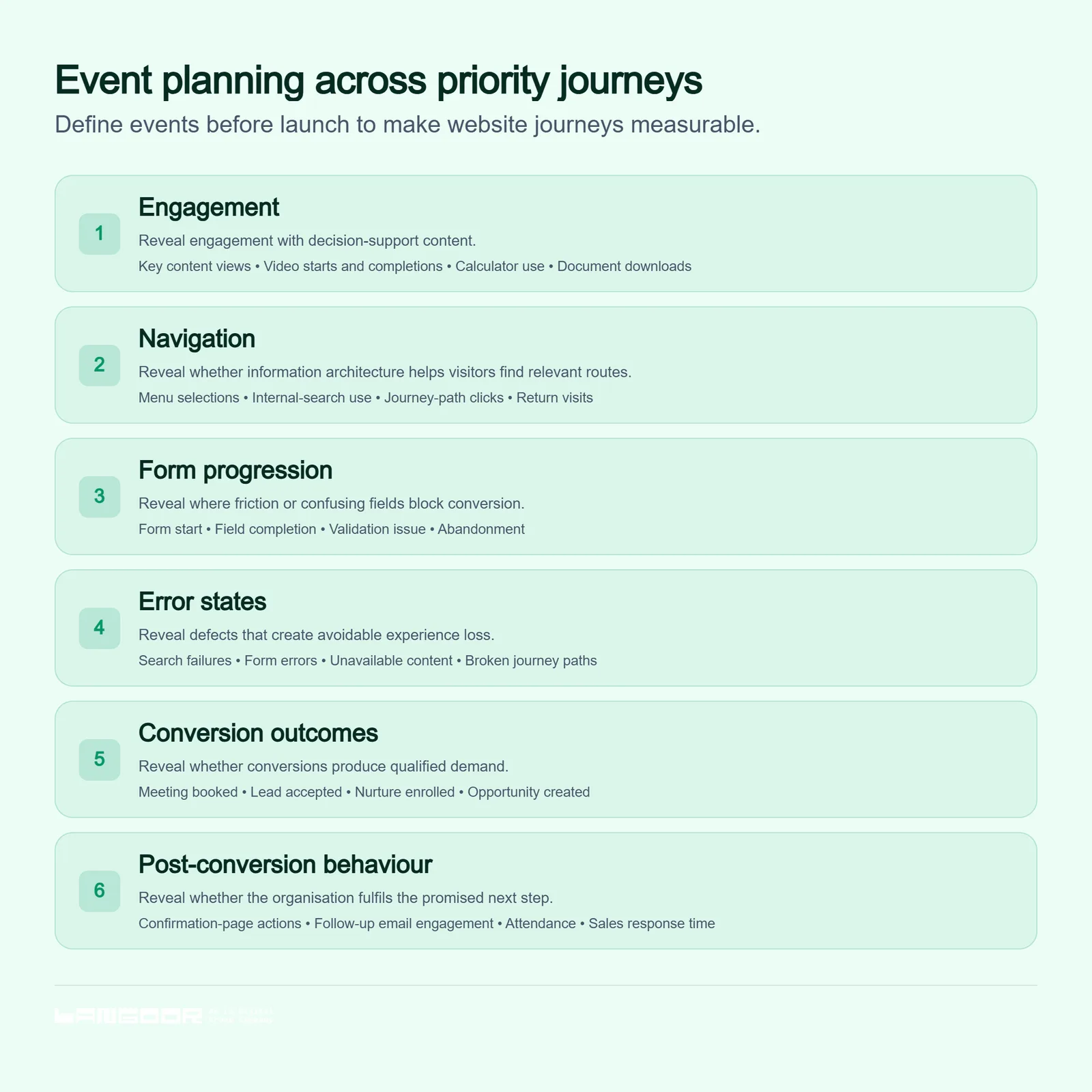
Plan event tracking as a design input before launch.
Accessibility needs to be included in this planning, not treated as a separate compliance workstream. The Web Content Accessibility Guidelines provide an internationally recognised foundation for making digital content more usable for people with disabilities. Error messages, keyboard interactions, form labels and focus states are especially important because they affect both inclusive access and the quality of conversion data.
Establish CMS governance that keeps content useful
A modern CMS can enable faster publishing, localisation and personalisation. It can also create inconsistency when anyone can add pages, modify templates or publish claims without clear accountability. Governance protects the quality of the experience while allowing teams to respond to changing market needs.
The objective is not to centralise every edit with a small web team. It is to create reusable systems, decision rights and review standards that let subject-matter experts contribute safely. Google’s SEO guidance similarly emphasises logical site organisation and descriptive, useful page content, both of which are easier to sustain with disciplined governance.
| Governance area | Recommended rule | Accountable owner |
|---|---|---|
| Content ownership | Every strategic page has a named business owner and review date | Marketing or product lead |
| Approval workflow | Brand, legal, regional and subject-matter review is risk-based, not identical for every edit | Content operations lead |
| Templates | Teams use approved modules for hero content, proof, CTAs and forms; exceptions need design review | Design system owner |
| Localisation | Regional teams can adapt approved messaging, while central teams protect core positioning and technical standards | Global-local content lead |
| Publishing cadence | High-value pages are reviewed quarterly; time-sensitive campaign content has an expiry or refresh date | Page owner |
| Content retirement | Underperforming, duplicated or obsolete pages are improved, consolidated or removed | SEO and content lead |
Governance should include structured metadata, accessible content standards and clear rules for AI-assisted drafting. AI can accelerate workflow, but it does not remove the need for expert validation, evidence checks and brand judgement. This is particularly important where AI-driven visibility and search discovery depend on clear, accurate, well-structured information.
Treat launch as the beginning of optimisation
Launch is the moment a website begins interacting with real audiences, channels and sales processes. It is not proof that the strategic assumptions were correct. Organisations should reserve budget, capacity and executive attention for an optimisation programme that prioritises improvements by expected value, confidence and effort.
An experimentation backlog helps turn scattered opinions into an evidence-led operating rhythm. Each test should identify the affected audience, hypothesis, primary measure, guardrail metric and decision rule. Avoid changing messaging, navigation and forms all at once; isolated tests make learning more reliable.
Messaging: A role-specific headline will increase engagement from priority accounts
Page structure: Moving evidence above capability detail will improve consultation intent
Forms: Reducing non-essential first-step fields will improve completions without reducing lead quality
Navigation: Task-based labels will reduce unnecessary internal-search use
Conversion friction: Showing response expectations beside a form will increase submissions
For commerce journeys, test checkout friction with particular care. Baymard Institute’s research on checkout usability documents how avoidable complexity can derail otherwise motivated purchasers. The underlying principle applies to B2B as well: remove uncertainty, explain requirements and ask only for what is necessary at each step.
Measure contribution to growth, not just website activity
Leadership needs a measurement framework that connects user experience to commercial outcomes. Traffic, impressions and time on page can be useful diagnostic signals, but they cannot show whether the website is creating demand, improving qualification or supporting revenue. A conversion-system view links leading indicators with outcomes that matter to marketing, sales and customer experience.
Use a layered scorecard that makes the chain of contribution visible:
| Measurement layer | Example metrics | Strategic question |
|---|---|---|
| Experience quality | Core Web Vitals, accessibility issues, task completion, error rate | Can priority audiences use the experience effectively? |
| Engagement quality | Depth of key-page engagement, return visits, content-path progression | Are visitors finding credible, relevant information? |
| Conversion quality | Form completion, meeting bookings, qualified lead rate, routing speed | Are the right people taking meaningful action? |
| Demand contribution | Marketing-qualified leads, sales-accepted leads, pipeline influenced | Is the website generating and progressing real demand? |
| Commercial outcomes | Opportunity value, win rate, revenue, retention or service-cost reduction | Is the investment contributing to business growth? |
Interpret these measures together. A rise in form volume alongside a fall in sales acceptance is not success; it may indicate weak targeting, misleading messaging or excessive form simplification. Conversely, lower traffic with stronger pipeline contribution may signal that the site is attracting a more relevant audience. This is why a website dashboard should be reviewed jointly by marketing, sales, experience and data teams.
Build a website that can keep earning its place
Fashionable interactions or a one-time launch does not define top digital marketing websites. They work because every important component has a job: help a visitor understand, build confidence, enable an action, capture a useful signal or improve the next iteration. Brand experience, technical performance, data intelligence and operational ownership reinforce one another.
Start with one priority journey. Trace it from entry channel to post-conversion follow-up, then ask whether the message is relevant, the proof is sufficient, the next step is clear, the data is usable and the outcome is measurable. These gaps will reveal where the website functions as a brochure rather than a growth system.
Langoor can help organisations build a strategy-to-platform roadmap that connects experience design, marketing data, automation and continuous optimisation. To move from a redesign project to a measurable digital growth programme, explore Langoor’s digital innovation approach.
You may also like this